

DevHub · Features
Agent Intelligence
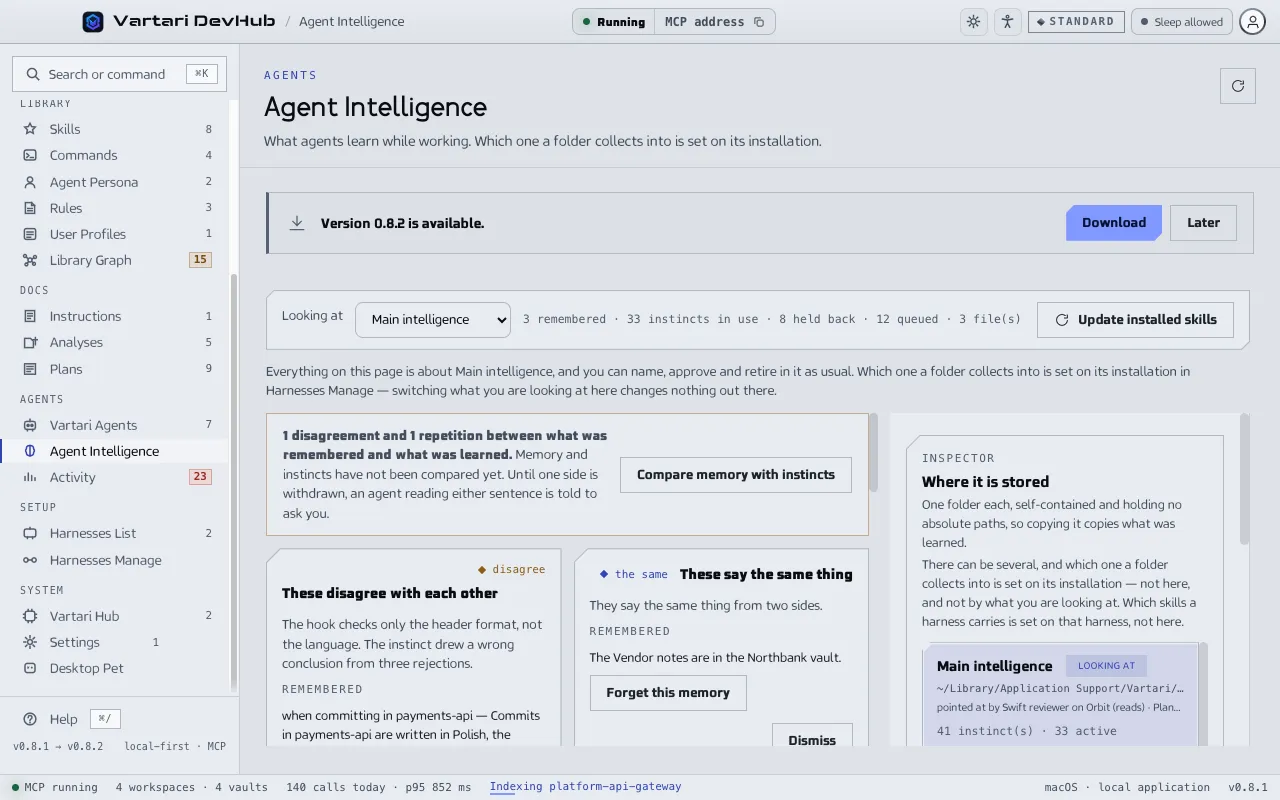
Agent Intelligence is the part of DevHub that remembers across sessions. It has two stores: Memory, what an agent was told, and Instincts, what DevHub concluded from failures that repeated. Nothing from either reaches an agent until you update the installed skills.
Memory and instincts
Section titled “Memory and instincts”| Memory | Instinct | |
|---|---|---|
| Where it comes from | An agent writes it down when somebody states a standing fact, with memory_note |
DevHub, from failures that repeated |
| Approval | None. It is recorded as it was said | You approve each one |
| Over time | Never expires | Loses confidence if the failure stops happening |
| To remove | Forget, which deletes it for good | Retire, which keeps it in the archive |
A memory is one of four kinds: who you work with, how you want it done, what is being built, and where to look. An agent also has a memory of its own inside its client, for example in Claude Code or Codex. DevHub writes nothing into it and reads nothing from it.
Read the What has been remembered list now and then. Whatever an agent writes there, every agent pointed at this intelligence reads as an instruction from the next update on, and nobody looked at it first. Forget anything that should not be there.
How an instinct is made
Section titled “How an instinct is made”- A failure happens. DevHub writes a hook into the settings of the client. The hook reports a failure to DevHub; the agent does not take part and is not slowed down.
- Arithmetic counts it. Three sightings of the same kind of failure make a pattern. A failure that stops happening loses confidence on its own. No model is involved.
- A model names what is new. It turns a pattern nobody named into one instruction: when it applies and what to do instead. This is the only step that calls a model, and it runs outside the agent’s session.
- You decide. Each named pattern waits in Waiting on you as a proposal. Approve writes it as an instinct. Refuse drops the proposal, and the failure stays in the queue so that a later run can name it better.
Naming is manual by default. Click Look for patterns to start it. Raw events are dropped after a retention period, so a long gap between analyses loses material. The model for the job is chosen on the page. In What has been captured you pick which items are worth naming and dismiss the rest with Not interesting.
A proposal says where it comes from: a failure, your own words, or an agent’s note. Judge one from your own words as a preference, not as evidence.
Give it to an agent
Section titled “Give it to an agent”Approving a proposal or recording a memory compiles it into files. The installed copies are updated when you click Update installed skills. The two steps are separate, and the page says so. What a person wrote always wins: a repository rule, an organization rule, a vault note or a shipped skill beats both memory and instincts. Between a memory and an instinct there is no fixed order. When they disagree, the agent is told not to choose and to ask you.
Compare memory with instincts runs only when you click it, because it asks a model to read everything the intelligence was told. It reports overlaps and contradictions as cards. Open contradictions are counted in red next to Agent Intelligence in the sidebar.
What is captured, and where
Section titled “What is captured, and where”Capturing is set per installation on Harnesses Manage, because the installation writes the hook. One installation that covers nine repositories captures for all nine through one switch. Which intelligence a folder collects into is also set there, not on this page. You can have several intelligences: create one, attach an existing folder, clone, rename or remove it. Each is a folder of its own that you can copy.
What this does not switch is what an agent writes down on purpose, such as a memory it was told. That arrives whatever the switch says.
If nothing is collected
Section titled “If nothing is collected”- The switch is set at a scope an installation does not cover. Switch it on at the scope the installation covers.
- The installation was written before the hook carried the intelligence. Write the installation again.
- Events arrive but nothing is named. Naming is manual: click Look for patterns.
The rows on Harnesses Manage say which of these applies. More in Troubleshooting.